What’s New in Dynamics 365 Field Service Mobile
Field service organizations rely on accurate, timely information to support day‑to‑day operations. With the latest improvements to the Dynamics 365 Field Service mobile app, we’re helping frontline workers stay productive and connected on the job.
Optimized for mobile experiences on iOS, Android and Windows, focusing on usability improvements designed to make the Field Service mobile app easier, faster, and more intuitive for frontline workers to use.
Enhanced Mobile Lists
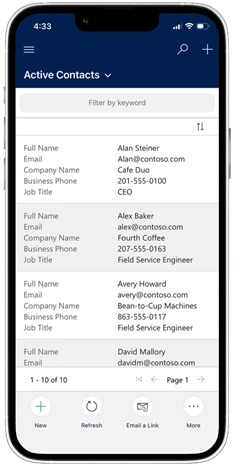
The Power Apps Grid on Mobile can now display more information directly in lists and subgrids. These updates allow lists to show more than three columns of data, remove row avatars, and display column labels alongside values. As a result, frontline workers can better scan relevant information, reducing the need to open individual records to find key details.
Documentation: Show more data in grids
Improved Booking Status Updates with Custom Icons
The Booking Status control has been updated to better align with mobile interaction patterns. Instead of a traditional dropdown, now access status through a clearly visible button that opens a drawer based selection experience. Plus, use custom icons for booking status types.
Documentation: Configure booking statuses with custom icons

A Modern, Mobile‑First Note‑Taking Experience
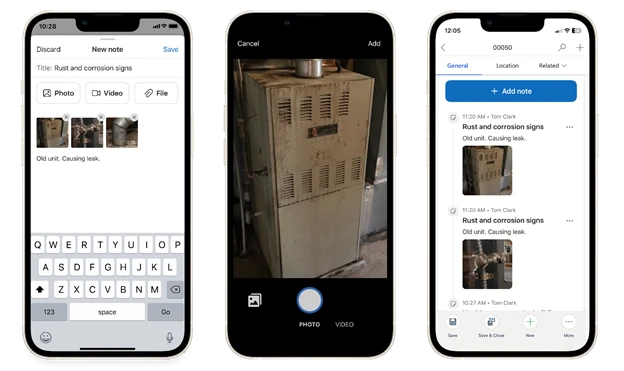
Instead of relying on desktop‑style timelines that can feel cumbersome on a phone or tablet, technicians now get a mobile‑optimized note‑taking experience that makes capturing information fast and timely.
What’s in the new note taking control:
- Streamlined, user-friendly experience for consuming past notes
- Multiple photos and videos per note, ideal for proof of work, and complex issues
- Capture notes in low‑ or no‑connectivity environments with offline support
- Seamless integration with the Timeline, ensuring notes are visible to the back office and managers
- Stores notes in the same table used by Timeline, allowing technician notes captured in the mobile control to remain visible to back-office staff who work in Timeline
Documentation: Add a control for note-taking
Faster, Smarter Lookups on Mobile
With lookup enhancements in Field Service mobile, technicians can quickly find and select related records without breaking their flow.
Disable Clickthrough to Reduce Unnecessary Navigation
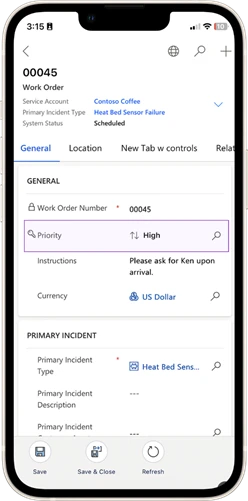
Disable lookup hyperlink click‑through. This helps reduce accidental miss‑clicks that lead to unnecessary navigation.
Documentation: Disable clickthrough on lookup
New Mobile Lookup Control
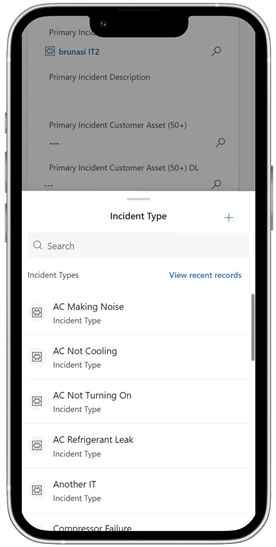
By streamlining lookups, the new mobile lookup experience reduces cognitive load through a modern bottom sheet design, improving overall efficiency and ease of use when selecting values. Lookup clickthrough can also be disabled within this new control, so technicians can avoid unnecessary clicks.
Documentation: Add a mobile lookup control
Ready to Adopt these Controls?
These updates reflect ongoing improvements to the Field Service mobile user experience, with a focus on making common interactions simpler and more efficient for frontline workers.
To take advantage of these enhancements, review the documentation linked throughout this article and update the environment to configure and enable the desired controls. Because these updates are opt-in and configurable, controls can be adopted based on organizational needs.
We’re actively listening and would love your feedback as you explore these capabilities. Please share your suggestions via the Ideas portal.
The post What’s New in Dynamics 365 Field Service Mobile appeared first on Microsoft Dynamics 365 Blog.