From Answers to Action: What’s New with Copilot in Dynamics 365
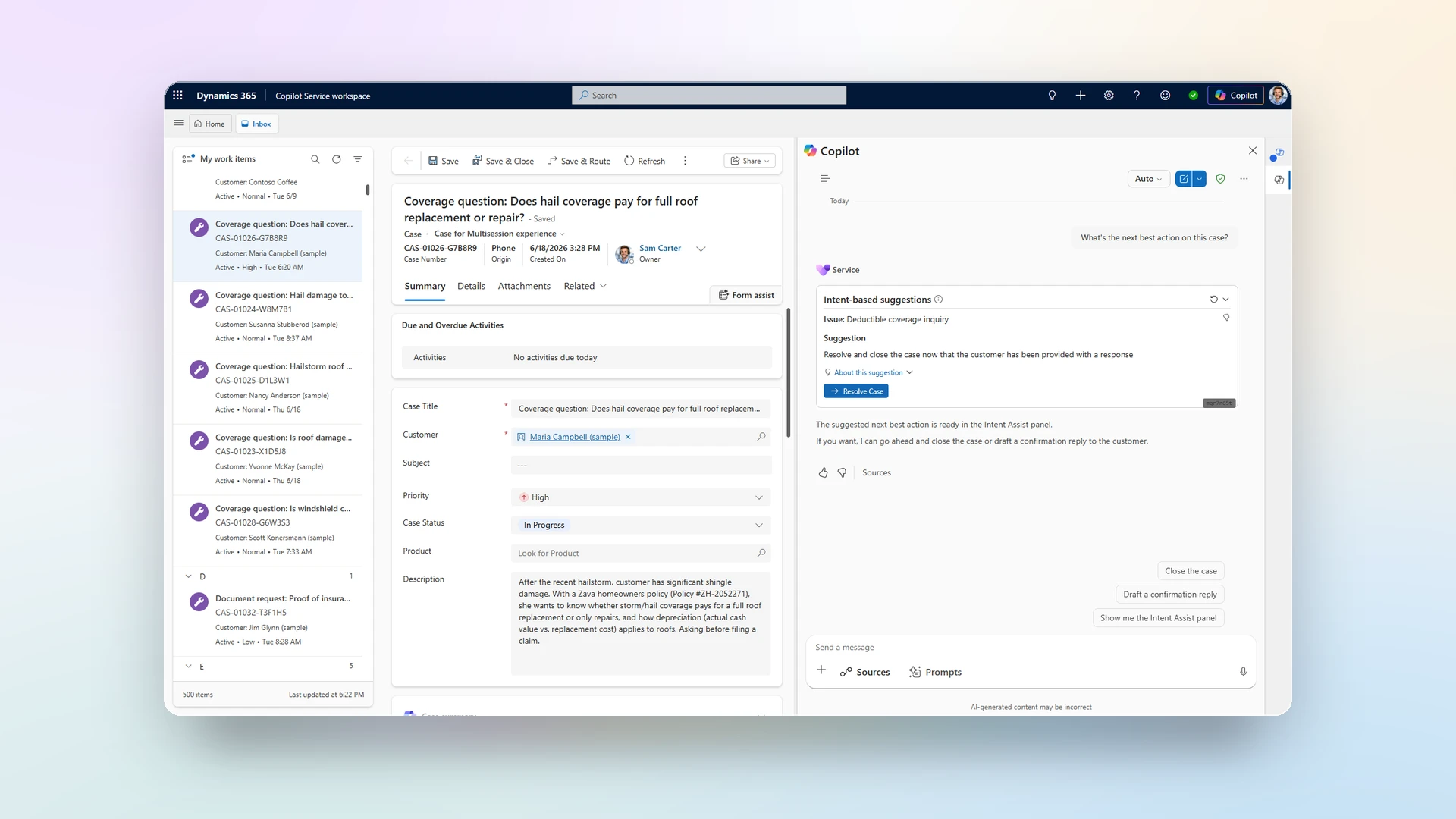
The new Copilot experience doesn’t just assist service professionals inside the CRM—it reasons and acts across the entire service workflow, wherever work happens. Here’s what changed, why it matters, and how you can adopt it quickly.
The shift from assisting to acting
The new Copilot experience in Microsoft 365 Copilot is a step towards unification across the Microsoft application ecosystem. It’s not only available in Dynamics 365, but in Outlook, Teams and other Microsoft 365 applications. The context and chat history carries across applications, meeting teams in the flow of work. This is achieved through the introduction of a dedicated declarative agent designed for service: Service Agent.
This post goes one level deeper on the question we hear most from service leaders at frontier organizations beginning the adoption: How is Service Agent different from the Copilot capabilities we already have in Dynamics 365 Customer Service?
The short answer: Service Agent in Microsoft 365 Copilot provides deeper case context, and supports actions across the whole resolution workflow. It builds on the existing Copilot foundation and operates across Microsoft 365 and Dynamics 365 applications, grounded in both Microsoft 365 graph and Dataverse data.
Now Generally Available
What’s new in Copilot in Customer Service
Copilot in Dynamics 365 Customer Service excels at answering and summarizing inside the CRM—case summaries, knowledge-grounded replies, email drafting, and proactive insights that elevate each interaction. Service Agent keeps all of that and adds three things that change the model:
Service Agent acts across the entire service lifecycle—not just inside one app. At general availability, a robust MCP server purpose-built for service powers Service Agent, with 90+ new MCP tools and MCP apps. Together they let service professionals understand, find, act, communicate, and improve without leaving the conversation:
- Case lifecycle: get, list, update, close, enrich, match, reassign, pick from queue, resolve-and-pick-next, and create cases from email.
- Customer insights: account and contact summaries, detail views, and lookup search.
- Knowledge: article search and detail, natural-language answers, draft articles, verbatim carousel, and category filtering.
- Email & drafting: view/draft/send, AI draft, template recommend-apply-insert, tone adjustment, translation, KB insert, and signatures.
- Case intelligence & next best action: case and conversation summaries, timeline highlights, suggested actions, follow-up cadence, and decision cards.
- Quality & coaching: case/conversation evaluation, coaching tips, and resolution-dialog fill.
- Prompt intelligence: Context-aware starter prompts, and a prompt gallery with bookmarks and chat history.
- Work with files: file upload and image understanding, image generation, on-demand charts from service data, the ability to create Word, Excel, and PowerPoint files
- Plus Workforce management, SLA and queue monitoring, activities and notes, intent and human-in-the-loop signals, and platform/admin operations.
It’s built to be extended and governed. Service Agent adds individual tool enablement, dynamic role-based access to tools, bring-your-own MCP tools and Copilot Studio agents, and customization of the MCP app in chat experiences.
Comparison at a glance
| Existing | What’s New? | |
| Primary mode | Assists, answers, summarizes | Reasons and acts across the workflow |
| Where it lives | Inside the CRM | Inside the CRM, M365 apps such as Teams, Outlook, M365 Copilot standalone |
| Grounding | Dataverse | Dataverse + Microsoft Graph via Work IQ |
| Extensibility | Microsoft Copilot Studio | Microsoft Copilot Studio + BYO MCP tools/Copilot Studio agents, widget customization |
How this benefits customers
- Faster resolution with less switching. The context professionals need—spread across cases, knowledge, emails, and conversations—is brought into one place, so they reason and act without hopping between systems. The conversation also carries across multiple apps in the flow of work.
- Stronger productivity and case hygiene. Routine actions (updating, closing, reassigning, follow-ups, notes) happen in the flow of the conversation, reducing post-interaction admin work and keeping records current.
- Faster ramp for new team members. Knowledge context and likely intent surface automatically, so new joiners get up to speed faster—a benefit early evaluators called out directly.
- Consistent, trusted answers. Synthesized, cited responses grounded in the systems teams already rely on, while respecting existing permissions.
- Roll out at your own pace. Granular, reversible controls—per role, per app module, let teams adopt gradually and run side-by-side with existing experiences during the transition.
“What excites us about Service Agent is the move from reactive search to proactive intelligence. When teams can behind the day with the right context, dependencies and handoffs already surface, and act on that trusted context from one place, it changes how service work gets done.”
DP Indetkar, Senior Vice President | AI Engineering Lead, Emerging Technology, Northern Trust
Roadmap: where Service Agent is headed
We are exploring the following investment areas next.
- Deeper app context and proactive experiences — richer awareness of service work across Dynamics 365 and Microsoft 365 apps, with role-based proactive prompts, insights, and next steps surfaced where professionals are already working.
- Stronger guardrails — expanded human-in-the-loop controls, approvals, and policy-aware execution for actions that carry customer, compliance, or operational risk.
- Mobile support in Microsoft 365 Copilot — bringing Service Agent into the mobile Copilot experience so service professionals can review context, take action, and stay current while on the go.
- More tools — continued expansion of the out-of-box MCP tool catalog, alongside richer bring-your-own MCP tools and Copilot Studio agent patterns for specialized service workflows.
How to get started
Service Agent is generally available now. Get started:
- Licensing. Customers need a Dynamics 365 Customer Service license (Enterprise or Premium edition) for access to case data, knowledge, and service workflows. A Microsoft 365 Copilot license unlocks the fully integrated experience—case context, Microsoft 365 data, and AI actions in one place. Premium tools are subject to Copilot Credit consumption.
- Provisioning. Admins provision Service Agent through the Microsoft 365 admin center.
- Roll out safely. Use the per-role, per-app-module, and per-queue controls to pilot with a team and run side-by-side with existing experiences before scaling.
Learn more
- Enable Service Agent in Microsoft 365 Copilot
- Service Agent Overview
- Overview of Dynamics 365 Customer Service MCP tools
- Related: Moving Sales and Service Organizations Forward with Agentic CX, Service Agent is now generally available
The post From Answers to Action: What’s New with Copilot in Dynamics 365 Customer Service appeared first on Microsoft Dynamics 365 Blog.